





When you first install your dash cam and connect it to a power source, you expect high-quality video recordings. But what if the footage looks blurry or unclear? Before assuming there’s an issue with the camera itself, check for common factors that can significantly impact the clarity of dash cam recordings.
1. Dirty Windshield: A Hidden Obstacle to Clear Recordings
Is your windshield clean? While dust, dirt, and oil films may be invisible to the naked eye, they can greatly affect your dash cam’s video quality. These impurities can create blurry or distorted images. Additionally, scratches or marks on the windshield can cause a starburst effect, distorting your footage and making it less useful.
To achieve crystal-clear recordings, ensure that both the interior and exterior of your windshield are thoroughly cleaned. Regular windshield maintenance can prevent these issues and help maintain the quality of your dash cam footage.
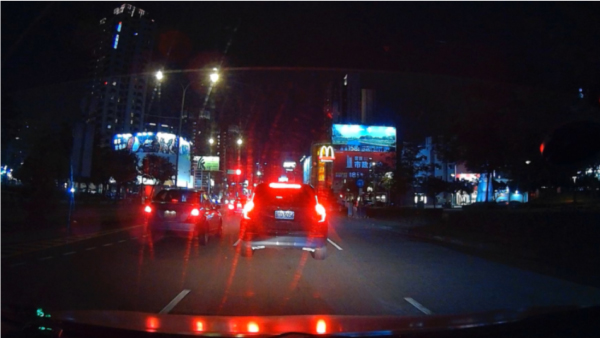
2. Windshield Scratches: The Starburst Effect
Scratches on your windshield can have a more significant impact on video quality than you might think. As light reflects off the scratched surface, it can cause a starburst effect or hazy distortions in the video, especially in low light or during the night.
If you’re experiencing unclear or distorted recordings, inspect your windshield for scratches or damage. A clean, smooth windshield is crucial for high-quality dash cam video.

3. The Tint and Aging of Heat Insulation Film
If you notice poor video quality despite a clean windshield, it could be due to the heat insulation film on your windows. Over time, the tint and aging of this film can affect how light passes through, potentially dimming or distorting your dash cam recordings.
To determine whether the heat insulation film is the issue, take your dash cam outside the car and record. If the quality improves, the problem likely lies with the tinted or aged heat insulation film. In this case, replacing or cleaning the film may help restore recording clarity.

4. Testing for Optimal Dash Cam Performance
To fully utilize your dash cam’s high-definition recording capabilities, it’s essential to rule out external factors like a dirty windshield or issues with the heat insulation film. By maintaining a clean windshield and ensuring the best possible visibility, you can enjoy clear, high-quality footage every time you drive.

Conclusion: Ensure Clear Dash Cam Recordings
The clarity of your dash cam recordings can be compromised by something as simple as a dirty windshield or aging heat insulation film. Regular maintenance and inspection of your windshield and window tints are key to achieving the sharpest and clearest video quality for your recordings. Keep your dash cam’s performance at its best and ensure your footage is always ready for review.
 Pernis Dash Cam Global
Leave a comment